
1. Log into your cPanel account.
2. In the "Files" section, click on "Backup Wizard" Icon.

3. Under "Backup or Restore" text, click on the "Backup" button.
4. In the 2nd step "Full or Partial Backup" option, under "Select Partial Backup", you need to click on "Home Directory" to download home directory only or should you wish to download only "MySQL Databases", click on "MySQL Database".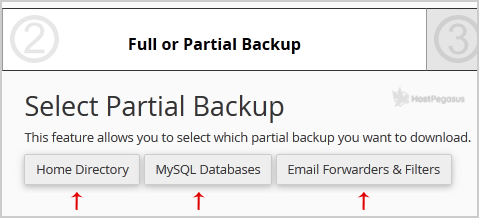
5. Now click on the "Download" link/button.
Most Popular Articles
How do I request to have an offsite backup restored?
How to generate a cPanel backup and sent it to FTP Server
1. Log into your cPanel account. 2. In the Files section, click on Backup Icon. 3. Under Full...
How to Restore cPanel Backup
1. Log into your cPanel account. 2. In the Files section, click on Backup Wizard Icon. 3. Under...
How to generate and download a full backup
1. Log into your cPanel account. 2. In the Files section, click on Backup Icon.3. Under Full...
